AI Card Bao AICARDBAO.COM
AI TOOL / #01277

Superagent

A secure platform for native AI development
Introduction

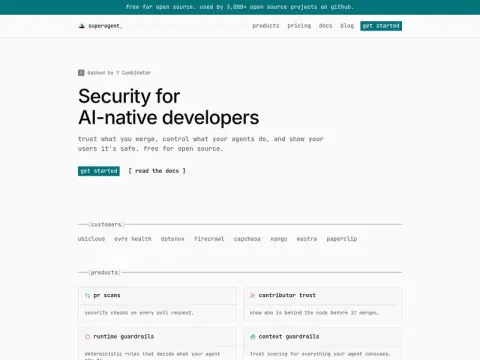
What Superagent does is to ensure security in scenarios where AI is used for native development. Simply put, when more and more code is being written or modified by agents, how can we guarantee that the code integrated into the main project is secure?

The product line is divided into five categories. PR scanning is used to identify problematic code before mergers take place; contributor trust mechanisms are employed to determine the source of submitted code; runtime safeguards restrict what agents can do in a production environment; context-related safeguards ensure that the data fed into the models is appropriate; finally, the red team is responsible for conducting proactive attack tests.

The project is supported by Y Combinator. According to official data, more than 3,000 open-source projects on GitHub are currently using this tool, and it is available for free to these open-source projects. Among the list of clients are developer tools companies such as Firecrawl, Mastra, and Nango.

This solution is suitable for teams that are already using coding Agents in a production environment. If your Agents are currently only used to write scripts locally, then this set of tools may not be necessary at present; however, once the Agents gain access to those repositories or start performing operations online, the problems they need to solve will immediately become very practical and urgent.

Visits:209 Updated:2026-11-29 Popular tools

Related

AI prompt words The “AI Prompt Collection” is a website that gathers 253 AI command prompts. These prompts can help your ChatGPT understand you better, resulting in higher-quality responses! The collection covers various industry categories, including writing, IT, translation, social interactions, SEO, finance, education, and teaching. Supported. GitMind AI GitMind is a cross-platform AI-based mind mapping software that helps you automatically generate mind maps, synchronizes data across multiple devices in real time, and offers a vast range of creative theme styles to choose from. It includes high-quality templates tailored for various industries and fields, making it ideal for creating reading notes, conducting brainstorming sessions, recording inspirations, managing product design processes, and organizing information. 4K films and videos Some netizens have reported that this website charges fees. Indeed, such a situation exists, so for the time being, we have removed it from the homepage. I actually think that some of the resources on this website are of relatively high quality. There are numerous high-definition online video streaming platforms out there, but I generally tend not to recommend them because most of them are filled with various types of annoying advertisements. Watermelon Creative Research Center With the explosive growth of short videos in recent years, anyone can become an excellent self-media creator. Whether it’s a hobby or a side business to engage in during your free time, self-media is definitely a great option. If you’re considering creating short videos but don’t know where to start, I recommend that you first take advantage of the free training programs offered by Xigua Video. China News Cloud Media China News Cloud Media: This is a website that aggregates content from various Chinese news media sources, including newspapers and live television broadcasts from the central government, provincial-level authorities, and 333 prefecture-level cities across the country. The development of cloud media has significantly lowered the barriers to accessing news; all one needs to do is open the relevant websites using a browser on a mobile phone, computer, or iPad to view the content. Snipaste Snipaste is a simple yet powerful screenshot tool that also supports the ability to paste images directly onto the screen. This makes it much more convenient for you to view the captured images, thereby significantly improving your work efficiency. Download and open Snipaste, press F1 to start taking a screenshot, and then press F3 to save it.