AI TOOL / #02217
CSV and Parquet viewer
Use Chrome extensions to view, filter, and analyze CSV and Parquet data, leveraging artificial intelligence technologies.
Introduction
View, filter, and analyze CSV and Parquet data with AI, using a Chrome extension.
What is the Tab Lab AI Chrome extension/plug-in?
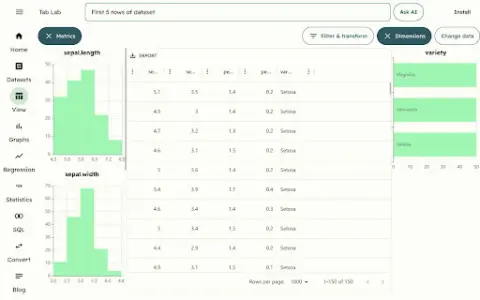
Tab Lab enables you to view, filter, and analyze CSV and Parquet data using artificial intelligence. The Tab Lab Chrome extension allows you to open CSV and Parquet files directly from websites within Tab Lab.
How to use the Tab Lab AI Chrome extension/plug-in?
Install the Tab Lab Chrome extension. This extension allows you to open CSV and Parquet files directly from websites. Then, use the Tab Lab interface to view, filter, and analyze the data.
The core functions of the Tab Lab AI Chrome extension/plug-in
View, filter, and analyze CSV and Parquet data.
Data analysis based on artificial intelligence
Chrome plugins allow you to open files directly.
Related
Mano – Your AI Copilot powered by GPT-4
An AI tool that utilizes Chrome extensions to offer expert-level proxy services and one-click functionality, thereby simplifying various tasks.
InfoCodex Document Summarizer
An AI-powered document summarizer for high-quality, structured, and time-saving summaries.
Bites
An artificial intelligence-powered cryptocurrency news aggregator that provides instant insights.
TurboLearn AI
TurboLearn AI generates notes, flashcards, and quizzes based on lectures to enhance the learning experience.
ChatX – Your AI Copilot for Web
An AI-assisted browser extension designed to help with the translation, summarization, and in-depth understanding of web content.
WPSummarize
An AI-driven WordPress plugin designed to automate the generation of content summaries and enhance reader engagement.