AI TOOL / #03920
ChatGPTalk Sidebar
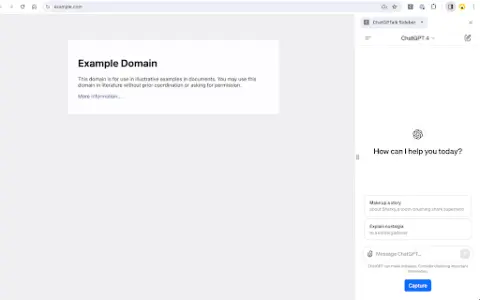
The ChatGPT integration in the sidebar facilitates text capture and interaction.
Introduction
ChatGPT integration in a sidebar for easy text capture and interaction.
What is the ChatGPTTalk Sidebar AI Chrome extension/plug-in?
The ChatGPTTalk Sidebar extension enhances the web browsing experience by integrating ChatGPT into a convenient sidebar. It allows users to extract text from web pages or YouTube subtitles and automatically copy it into the ChatGPT input field for generating summaries or performing other interactions. This extension also includes prompt templates and intelligent text segmentation features, which make it easier to work with longer documents.
How to use the ChatGPTTalk Sidebar AI Chrome extension/plug-in?
Install the ChatGPTTalk Sidebar extension. Open a web page or a YouTube video, and then click the “Capture” button in the sidebar to extract the text or subtitles. The extracted text will be automatically copied and pasted into the ChatGPT input field, along with a predefined prompt template. You can then interact with ChatGPT as needed.
The core functions of the ChatGPTTalk Sidebar AI Chrome extension/plugin
Integration of ChatGPT
Text capture
prompt template
YouTube subtitles
Intelligent text segmentation
Related
WizyChat
A custom GPT chatbot builder that requires no coding.
Sofon
The knowledge discovery engine transforms experts' opinions into personalized idealetters.
Medriva
An enterprise AI platform used for building and deploying AI applications that incorporate real-time RAG technology.
Knowz
An artificial intelligence-based search tool that provides fast and accurate results, and also supports knowledge base management.
PixieBrix
An AI-based browser extension platform that enables the customization of web applications and workflows.
SigmaNote – your second brain
AI-powered tools convert files/linkages into editable and searchable notes.