AI TOOL / #03939
Text Explorer
AI-powered tools optimize the reading experience by highlighting relevant information and keywords.
Introduction
AI-powered tool for optimized content reading by highlighting relevant information and keywords.
What is the Text Explorer AI Chrome extension/plugin?
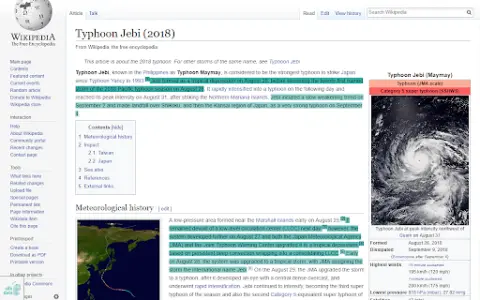
Text Explorer is an easy-to-use AI-powered tool designed to optimize the reading experience by highlighting relevant information and keywords. It helps users save time and focus on the most important parts of an article, eliminating the need to read the entire text in order to find the desired information.
How to use the Text Explorer AI Chrome extension/plug-in?
To use the Text Explorer, simply activate the extension on the page you wish to read. Key elements will be highlighted automatically. You can switch between word/sentence display modes and adjust custom settings using the toolbar at the bottom of the page. Click the extension icon on the Chrome toolbar or the close button (red X) in the lower-left corner of the web page. For more advanced options, click the extension icon to access the full graphical user interface, where you can select keywords and key sentences, enable named entities with emojis, change the highlight color, designate custom text areas, and adjust the language of the web page.
The core functionality of the Text Explorer AI Chrome extension/plugin
Highlight key words and important sentences.
Accurately identify named entities.
Supports English, German, and Russian.
The highlighting color can be customized.
The number of keywords and key phrases can be adjusted accordingly.
Related
HiringNow
Job-seeking agents who closely monitor corporate official websites to submit applications in advance
Tapemoon
Create a time-stamped MV for your own song
Glaido
AI dictation that allows users to speak by holding down a key
Omw... a castle and valley depicted with the brushstrokes of an oil painter.
Turn that “omw” pixel art created by @de5imulate into a three.js game that can be played in the browser – the entire visual effect should resemble the strokes of an oil painting.
Collection Page for Three Games (Saltline / Heart of a Watchmaker / Tidewright)
The page is credited to Felix Rieseberg, and it is clearly stated that all three versions are preliminary drafts of Fable 5.2, with no human feedback having been incorporated into their development. The link that has been shared the most contains the video posted by the user @vineerpasam.
Hogwarts Royale (Harry Potter × Clash of Clans)
Survival Mode