AI TOOL / #04050
AI Roundtable
Ask a question and receive answers from multiple AI assistants.
Introduction
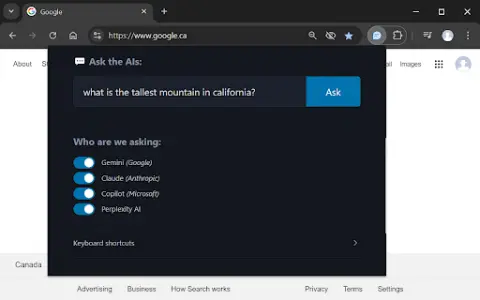
Ask one question, get answers from multiple AI assistants.
What is a Multiple AI Assistants Chrome extension/plug-in?
This website allows users to submit questions at once and receive answers from multiple AI assistants. Users can customize which assistant they want to use for their queries. The website also provides keyboard shortcuts, making it easy to access various functions quickly.
How to use the Multiple AI Assistants Chrome extension?
Use the shortcut keys Ctrl/Cmd + Shift + Q to open the query window and start typing your question. Use Alt + 1 to switch to Gemini, Alt + 2 to switch to Claude, Alt + 3 to switch to Copilot, and Alt + 4 to switch to ChatGPT.
The core functions of various AI Assistant extensions/plugins for Chrome.
Query multiple AI assistants simultaneously
It is possible to customize the selection of AI assistants.
Convenient and fast keyboard shortcuts
Related
HomeScore
An AI-powered home purchasing assistant that helps users make more informed decisions and save money.
Anyone.com
Anyone.com simplifies the home buying and selling process with transparency and AI-powered agent matching.
Lettria
Lettria uses AI and GraphRAG to turn unstructured data into structured knowledge.
Patent Highlighter
Browser extensions that highlight technical information in patents while suppressing legal jargon.
PIXMO
Pixmo uses artificial intelligence to protect digital assets from theft and copyright violations.
CaseMark Workflow – AI for Legal
An AI-powered Chrome extension designed for legal workflows, capable of summarizing documents, extracting information, and generating legal texts.