AI TOOL / #04201
Edstension
Chrome extensions for EdStem and Moodle offer AI-generated answers as well as LaTeX preview functionality.
Introduction
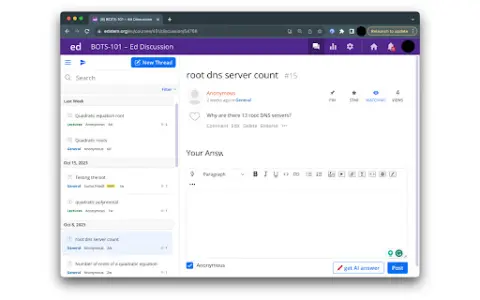
Chrome extension for EdStem & Moodle providing AI answers and LaTeX previews.
What are the EdStem & Moodle AI Assistant Chrome extensions/plugins?
This Chrome extension integrates with EdStem and Moodle, providing educators with an AI-assisted tool. It adds a button to the forum interface that enables AI-generated answers to student questions and real-time LaTeX previews, thereby enhancing work efficiency and the quality of responses provided by educators.
How to use the EdStem & Moodle AI Assistant Chrome extension/plug-in?
Install the Chrome extension. It will automatically detect both the EdStem and Moodle platforms and add a button to the forum interface. By clicking this button, you can generate answers powered by AI technology and view previews of your LaTeX documents.
The core functions of the EdStem & Moodle AI Assistant Chrome extension/plug-in
Suggestions for AI-powered forum Q&A systems
Real-time LaTeX preview
Seamless integration with EdStem and Moodle
Related
Broken Bear
A comforting AI chatbot that loves your broken self.
ChatGPT Dansk
A free Danish-speaking chatbot that uses artificial intelligence to understand and respond in human language.
VersaBot
Versabot utilizes AI-powered robots to automate various aspects of marketing efforts, content creation, and customer service across all channels.
Mottle Bot
Mottle is a code-free platform that allows users to create custom AI chatbots using text files.
LMGTFY + GPT = LetMeGPT
LetMeGPT combines the functionality of LMGTFY with that of GPT, enabling it to easily answer questions that can be found online.
Web2Chat
Web2Chat: Create AI chatbots for your website, tailored to the content you have.