AI TOOL / #04236
DeepSeek AI
An AI-powered tool for analyzing web content and providing answers.
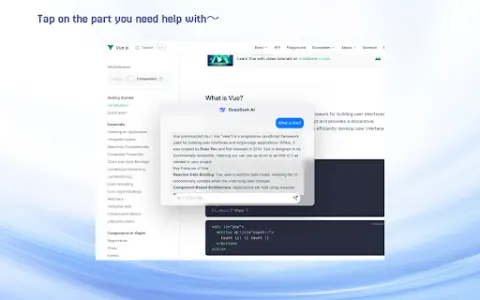
Introduction
AI-powered tool for web content analysis and answering.
What is the DeepSeek AI Chrome extension/plug-in?
DeepSeek is an AI-powered tool designed to provide users with intuitive and efficient capabilities for analyzing web content and obtaining answers. By selecting text from a webpage, users can leverage DeepSeek’s advanced AI models to obtain in-depth analyses and relevant information.
How to use the DeepSeek AI Chrome extension/plug-in?
1. Install the DeepSeek extension from the Chrome Web Store.
2. Enter your API key to activate the custom AI service.
3. Select the text on the web page, right-click on it, and choose DeepSeek to obtain intelligent answers.
The core functions of the DeepSeek AI Chrome extension/plug-in
Intelligent responses to the text on the selected web page
Customize API integration to enable personalized AI services.
Multi-language support
User-friendly interface
Protect privacy through local data processing.
Related
Swifty
An AI travel booking engine that automates planning, booking, payment, and invoicing through chat.
Sierra
A dialogue-based artificial intelligence platform designed to enhance the customer experience for enterprises.
Toma
An AI automation platform for automobile dealers, enabling automated call handling and scheduling.
Revia – Personal phone call AI
An AI assistant that can make calls with one click.
Ad-Free AI Chat
An ad-free AI chat application designed for Android, featuring voice chat, gaming, and learning tools.
Elixir
An AI operations and maintenance platform along with quality assurance mechanisms designed for voice agents, ensuring reliability and helping to identify errors.