AI TOOL / #07146
ImageToText
An extension that copies text from images on the internet via the OCR.Space API.
Introduction
An extension to copy text from images on the internet using OCR.Space API.
What is the OCR.Space API AI Chrome extension/plugin?
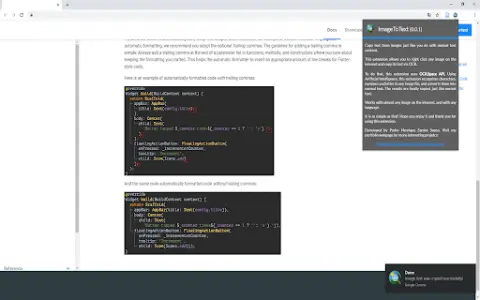
This extension lets you copy text from any image on the internet just like regular text content. Simple—that's the goal of this app. Just right-click the image, select “Copy Image Text,” and you're done… You can use and paste the text you see in that image. It's very useful for extracting text from informative, entertaining, and code-block images. Now you don't have to rewrite everything—with this extension, the problem is solved. To process images, this extension uses the OCR.Space API.
How do I use the OCR.Space API AI Chrome extension/plugin?
Right-click an image, select "Copy Image Text," and then paste the extracted text.
Core features of the OCR.Space API AI Chrome extension/plugin
Copy text from images on the internet.
Related
AIskNet
A browser extension that uses local AI models to answer questions related to the content of web pages.
DecodeMed
An artificial intelligence-driven biomedical search engine, used for finding relevant research papers and evidence-based answers.
Astro Answer New Tab
AI-powered horoscopes and personalized answers in every new browser tab.
GPT Notification/Quiz – STRI
An AI-driven extension designed to provide fast and accurate answers to questions.
Classmate – AI Homework Help
An AI-based learning assistant designed for immediate problem-solving and learning support.
NinjaSolver Extension
An AI-based browser extension designed to capture, analyze, and understand web content.