AI TOOL / #07222
ReadImage
Extract, edit, and copy text from images on web pages.
Introduction
Extracts, edits, and copies text from images on web pages.
What is Image Text Extractor ai chrome extension/plugin?
This extension allows users to extract text from images displayed on web pages. It supports common image formats such as jpg, jpeg, png and bmp. After extraction, the text can be edited and copied.
How to use Image Text Extractor ai chrome extension/plugin?
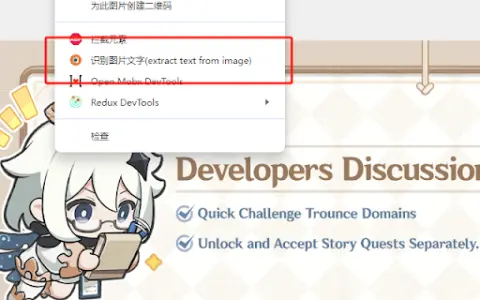
Hover your mouse over the image, right-click and select "Extract text from image". Press "Ctrl + Q" to view the extracted text on the extension page, where it can be edited and copied.
Image Text Extractor ai chrome extension/plugin core features
Extract text from images on web pages
Edit extracted text
Copy extracted text
Related
Kits AI
Kits AI provides producers with professional-grade AI music tools, including sound cloning and master processing capabilities.
Chat GPT for android
An Android AI chatbot application based on ChatGPT, equipped with a variety of intelligent features.
SongGenerator.io: AI Music Generator Free Online
An AI music platform designed for creating copyrighted-free songs, equipped with tools that can convert text into music and remove vocals from recordings.
AIMusics.Net
A platform for creating, sharing, and discovering music generated by AI.
rhyme.cool
An AI-powered rap lyric generator that can accommodate the style of any singer.
AI Music (Free)
A platform that uses AI to generate unique music based on lyrics or create instrumental works.