AI TOOL / #07462
Vision AI
A Chrome extension that enables AI-driven insights based on screenshot data.
Introduction
Chrome extension for AI-powered insights from screenshots.
What is a Vision AI Chrome extension/plug-in?
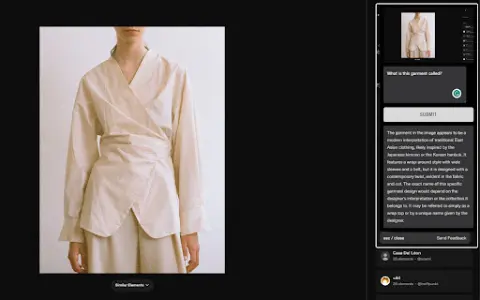
Visual AI is a Chrome extension that combines screenshot functionality with AI-driven insights to enhance online information search. It allows users to capture any portion of a web page, add notes or questions, and receive AI-generated responses based on the context of the captured image.
How to use the Vision AI Chrome extension/plug-in?
Install the Visual AI Chrome extension. Use CTRL + SHIFT + Y to take a screenshot, and then add any notes or questions you have. Visual AI will analyze the screenshot and provide an AI-generated response.
The core functions of the Vision AI Chrome extension/plugin
Screenshot capture
Interactive AI Suggestions
Seamless browser integration
Suitable for a wide range of applications in various fields
Privacy and Security
Related
SealReply
A free online customer service platform designed for small teams
Panda3DS
An open-source Nintendo 3DS emulator that utilizes the HLE (High-Level Emulation) technique. It is maintained by independent developers and is constantly being updated.
Kega Fusion
This is a versatile simulator from Sega, capable of supporting devices such as the Sega Genesis/Mega Drive, Sega CD, 32X, Master System, and Game Gear. It offers excellent compatibility and sound quality.
Night God Simulator
An Android emulator designed for running mobile games and applications on PCs. It is known for its ability to run multiple apps simultaneously and its stability, making it ideal for mobile game development studios and avid mobile gamers.
Nameshot
A small tool that automatically names screenshots taken on a Mac
Jinjiang Literature City
Female-oriented original online literature platform