AI TOOL / #08846
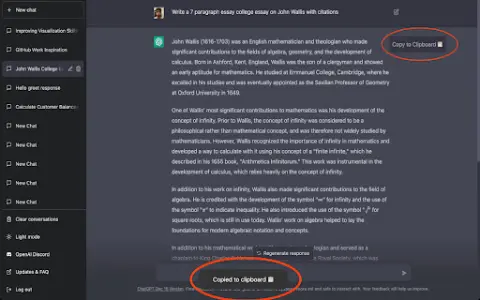
Copy for Chat GPT
An extension used to copy ChatGPT responses and check for plagiarism.
Introduction
Extension to copy ChatGPT responses and check for plagiarism.
What is the Plagiarism Detector Extension for Chrome – an extension/plug-in for Google Chrome?
This extension allows you to copy the responses generated by ChatGPT by clicking a button or using the CMD+K shortcut key, and then have those responses checked by plagiarism detection tools.
How to use the Plagiarism Detector Extension for Chrome?
You can use this extension by clicking the copy button on ChatGPT’s response or by pressing CMD+K. The copied text will be automatically checked to determine whether it contains any plagiarized content.
The core functionality of the Plagiarism Detector Extension for Chrome.
One-click to copy the response from ChatGPT
Use the CMD+K shortcut key to copy.
Automatic plagiarism detection
Related
Steam BR prices
Browser extensions automatically check and display the prices of Steam games mentioned in forum posts, showing how these prices vary depending on the region.
TENNI
Tenni is a tennis companion app that connects players, fans and brands around the world.
Kinder games
An educational sliding game suitable for children, where learners can explore and learn through clicking and swiping.
Digital Pets
A pet simulation game based on Chat GPT with unlimited storyline and adventure.
ArcaneLand
A text-based AI adventure game that includes tasks, items, and a dice-rolling system.
ChatDev IDE: Building your AI Agent
A web-based IDE designed for collaborative work with AI agents and the development of GPT models.