AI TOOL / #09614
QPEDIT
A Chrome extension integrated with QPNOTES, offering AI-powered writing, editing, and reminder management features.
Introduction
Chrome extension for AI-powered writing, editing, and prompt management with QPNOTES integration.
What are the QPEDIT With AI & QPNOTES Chrome extensions/plugins?
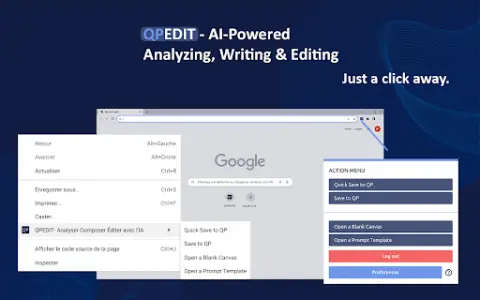
QPEDIT, in conjunction with AI, is a Chrome extension that works together with QPNOTES – a library designed for storing, organizing, sharing, and discovering tips as well as advanced AI-powered commands. QPEDIT enhances the functionality of QPNOTES within your workflow, allowing you to leverage AI capabilities with just one click. It only processes the content that you select, copy, enter, or drag into it, providing AI-driven analysis, writing, and editing tools directly within Chrome.
How to use the QPEDIT With AI & QPNOTES Chrome extension?
Right-click on any location, or right-click on selected text to invoke QPEDIT. You can enter a custom prompt or choose from pre-built options. Simply drag the content from QPNOTES into your own prompt. Alternatively, you can use the menu options available in Google Chrome.
The core functions of the QPEDIT With AI and QPNOTES AI Chrome extension插件.
AI-driven analysis, writing, and editing features in Chrome
Integrated with QPNOTES for easier management of reminders.
Access through the context menu and Chrome action menu.
The drag-and-drop feature is used to add content to the prompt.
Supports a variety of AI models (OpenAI, Anthropic).
Customizable prompts and pre-built prompt libraries are available.
Related
Relay
When sending a document, include the background image as well. Pass it along to the other party’s AI system together with the rest of the content.
Mister Blocks
Take a photo of the building blocks, and a assembly plan will be generated automatically.
Project64
The most classic Nintendo 64 emulator, featuring excellent compatibility and support for high-definition texture packs as well as widescreen patches. It is the ideal choice for playing games like “The Legend of Zelda: Ocarina of Time” and “Super Mario 64”.
MAME
The “bible” of arcade emulators, officially named Multiple Arcade Machine Emulator. This software is dedicated to replicating the hardware of arcade game systems within a software environment. It has been in active development since its release in 1997 and remains so to this day.
OpenEmu
A multi-platform emulator with a beautiful interface and intuitive operation – it supports dozens of different systems including FC, SFC, GB, GBA, N64, PS1, and more, making it the ideal choice for Mac users.
Nod
The open-source personal assistant intelligent agent developed by n8n